 Curated by
 Quick picks
-
Best dual arm for most peopleCheck price on Amazon (opens in a new tab, affiliate link)
1. Amazon Basics Dual Gas Spring
Best for: Two everyday 24–27-inch monitors on a normal desk
-
Best for curved and 34-inch screensCheck price (opens in a new tab, affiliate link)
2. BONTEC Dual 15–34"
Best for: Two curved or larger monitors up to 34 inches
-
Best for big, heavy monitorsCheck price (opens in a new tab, affiliate link)
3. Invision MX900
Best for: Two large, heavy monitors from 24 to 35 inches

Show all 6 picks
-
Best premium dual armCheck price (opens in a new tab, affiliate link)
4. Ergotron LX Dual
Best for: People who want the arm to last and move smoothly for years
- Check price (opens in a new tab, affiliate link)
-
Best if you can't clamp to your deskCheck price (opens in a new tab, affiliate link)
6. VIVO STAND-V002F
Best for: Glass desks, bevelled edges, rented furniture or desks against a wall
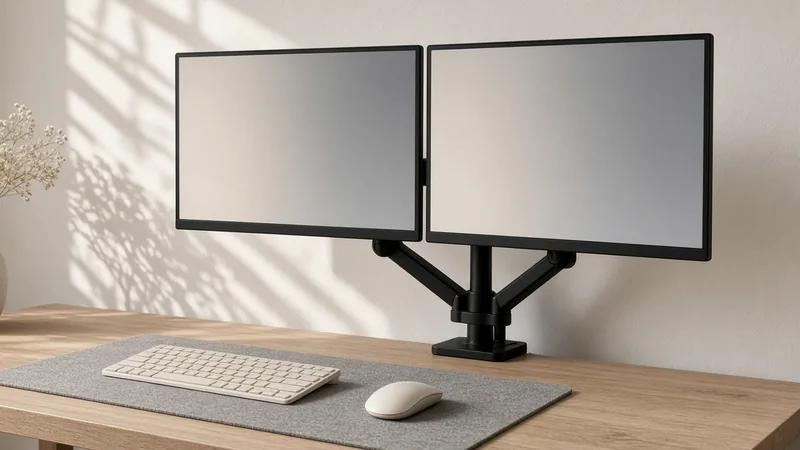
A dual monitor arm frees up desk space and lets you line two screens up properly, but only if it suits your monitors and your desk. Before you look at any arm, check four things: your monitors’ VESA pattern (almost every arm here takes 75×75mm and 100×100mm), each monitor’s weight without its stand, the screen size, and your desk thickness at the edge where the clamp goes. We’ve put those limits on every card. (Here’s how we choose products.)
- Best dual arm for most people: Amazon Basics Dual Gas Spring (#1)
- Best for curved and 34-inch screens: BONTEC Dual 15–34" (#2)
- Best for big, heavy monitors: Invision MX900 (#3)
- Best premium dual arm: Ergotron LX Dual Side-by-Side (#4)
- Best budget pole mount: VIVO STAND-V002 (#5)
- Best if you can’t clamp to your desk: VIVO STAND-V002F freestanding (#6)
Compare all 6 picks
| # | Product | Best for | Key spec | Link |
|---|---|---|---|---|
| 1 | Amazon Basics Dual Monitor Arm Desk Mount, Gas Spring, 15–27 Inch (black)Best dual arm for most people | Two everyday 24–27-inch monitors on a normal desk | 15–27in · 2–7kg per arm · VESA 75/100 · gas spring · desks 1–10.2cm | Check price (opens in a new tab, affiliate link) |
| 2 | BONTEC Dual Monitor Stand for 15–34 Inch Screens, Gas Spring (GDM7506)Best for curved and 34-inch screens | Two curved or larger monitors up to 34 inches | 15–34in flat or curved · up to 12kg per arm · VESA 75/100 · gas spring · desks 1–8cm | Check price (opens in a new tab, affiliate link) |
| 3 | Invision MX900 Dual Monitor Arm, Gas Assisted, 24–35 InchBest for big, heavy monitors | Two large, heavy monitors from 24 to 35 inches | 24–35in · 2–15kg per arm · VESA 75/100 · gas assisted · 630mm reach | Check price (opens in a new tab, affiliate link) |
| 4 | Ergotron LX Dual Side-by-Side Arm (white, 45-491-216)Best premium dual arm | People who want the arm to last and move smoothly for years | Up to 27in · 3.2–9.1kg each · VESA 75/100 · Constant Force · desks 1.6–6.6cm · 10-year warranty | Check price (opens in a new tab, affiliate link) |
| 5 | VIVO Dual Monitor Desk Mount, Steel, 13–30 Inch (STAND-V002)Best budget pole mount | Two monitors you set once and leave | 13–30in · up to 10kg each · VESA 75/100 · fixed arms on a pole · desks up to 8cm | Check price (opens in a new tab, affiliate link) |
| 6 | VIVO Dual Monitor Free-Standing Desk Stand, 13–27 Inch (STAND-V002F)Best if you can't clamp to your desk | Glass desks, bevelled edges, rented furniture or desks against a wall | 13–27in · up to 10kg each · VESA 75/100 · freestanding base 33 × 26.7cm | Check price (opens in a new tab, affiliate link) |
1. Amazon Basics Dual Monitor Arm Desk Mount, Gas Spring, 15–27 Inch (black)
by Amazon Basics
Price & availability on Amazon.co.uk
Who it’s for: Most home and office setups with two matching 24- or 27-inch monitors that aren’t especially heavy.
Verdict: Our pick for most people. Each arm has its own gas spring and its own tension adjustment, so you can raise, lower and pull each screen towards you separately and it stays where you leave it. It takes screens from 15 to 27 inches and 2 to 7kg per arm, and comes with both a C-clamp and a grommet mount for desks 1 to 10.2cm thick – a wider range than most. Amazon notes the springs come set for heavier screens and the joints come tight, so expect to adjust it once it’s on the desk.
What we like
- Independent gas spring arms, each with its own tension adjustment
- Clamp and grommet for desks 1–10.2cm thick
- Listing gives screw and spacer guidance for recessed VESA holes
- Sold by Amazon when we checked
Worth knowing
- 7kg per arm limit – check heavier 27-inch monitors
- Needs tension adjusting out of the box
Key specs
- Screen size
- 15–27in
- Weight per arm
- 2–7kg
- VESA
- 75×75, 100×100
- Mechanism
- Gas spring, independent arms
- Desk mount
- C-clamp or grommet, 1–10.2cm desk
- Model
- DS-MADDBE
Source: Amazon UK product listing (seller-provided details), checked 8 October 2026.
2. BONTEC Dual Monitor Stand for 15–34 Inch Screens, Gas Spring (GDM7506)
by BONTEC
Price & availability on Amazon.co.uk
Who it’s for: Gamers and creators running two big or curved screens, such as a pair of 32-inch monitors.
Verdict: If your screens are bigger or heavier than the Amazon Basics arm allows, this BONTEC goes up to 34 inches and 12kg per arm, and the listing says it suits curved screens. Each arm is gas sprung, with tilt from +85° to -50°, ±90° swivel, full rotation and up to 48.5cm of height. It comes with both a C-clamp and a grommet base for desks 1 to 8cm thick, plus snap-in cable management. Two side-by-side 34-inch screens are very wide, so check the arm reach suits your desk.
What we like
- Up to 12kg per arm – the highest here after the Invision
- Takes curved screens up to 34 inches
- Clamp and grommet included
Worth knowing
- Sold by a third-party seller (bracketsales123), dispatched by Amazon
- The listing’s warranty field says ‘NO’ and it gives no minimum monitor weight
Key specs
- Screen size
- 15–34in, flat or curved
- Weight per arm
- Up to 12kg
- VESA
- 75×75, 100×100
- Mechanism
- Gas spring, independent arms
- Movement
- +85°/-50° tilt, ±90° swivel, 360° rotation, up to 48.5cm height
- Desk mount
- C-clamp or grommet, 1–8cm desk
- Model
- GDM7506
Source: Amazon UK product listing (seller-provided details), checked 8 October 2026.
3. Invision MX900 Dual Monitor Arm, Gas Assisted, 24–35 Inch
by Invision
Price & availability on Amazon.co.uk
Who it’s for: Anyone with two heavy 27- to 35-inch monitors, or who wants plenty of reach to pull the screens towards them.
Verdict: The heavy lifter. Invision, a UK company, rates each arm for 2 to 15kg and screens from 24 to 35 inches, with up to 630mm of reach, 360° rotation and +85° to -30° tilt. The arms are gas assisted with tension adjustment, and the manual gives a clamp range of 20 to 80mm, or a through-desk mount for 20 to 90mm desks using a 10mm hole at least 40mm from the back edge. Invision gives a two-year warranty and a ‘compatibility promise’ to help if your monitor’s VESA holes are recessed.
What we like
- Up to 15kg per arm, the most on this list
- Long 630mm reach
- UK brand with a two-year warranty
- Sold by Invision’s own store, dispatched by Amazon
Worth knowing
- Not for screens under 24 inches
- The clamp needs a desk at least 20mm thick
Key specs
- Screen size
- 24–35in
- Weight per arm
- 2–15kg
- VESA
- 75×75, 100×100
- Mechanism
- Gas assisted, independent arms
- Reach
- 630 mm
- Desk mount
- Clamp 20–80mm; through-desk 20–90mm (10mm hole)
- Warranty
- 2 years
Source: Invision product page and MX900 manual (checked 8 October 2026).
4. Ergotron LX Dual Side-by-Side Arm (white, 45-491-216)
by Ergotron
Price & availability on Amazon.co.uk
Who it’s for: Anyone who adjusts their screens a lot, or wants a dual arm with a long warranty from a specialist maker.
Verdict: This is Ergotron’s side-by-side dual arm: two independent arms on a pole. Instead of a gas spring it uses Ergotron’s Constant Force mechanism, with 33cm of lift, 360° rotation and 75° tilt, and each screen can be 3.2 to 9.1kg (18.1kg combined). Ergotron’s spec sheet lists a typical screen size of 27 inches. The clamp fits desk edges 1.6 to 6.6cm thick, and the grommet mount is sold separately for this version. It’s backed by a 10-year warranty.
What we like
- 10-year warranty
- Constant Force mechanism with 33cm of lift
- Two independent arms on a pole
Worth knowing
- Sold and shipped by a third-party seller (KitUP Limited), with 10 left when we checked
- Clamp only – the grommet mount is an extra, and desks over 6.6cm won’t fit
- White only at this listing
Key specs
- Screen size
- Up to 27in (typical, per Ergotron)
- Weight per arm
- 3.2–9.1kg (18.1kg combined)
- VESA
- 75×75, 100×100
- Mechanism
- Constant Force (not gas spring)
- Desk mount
- 2-piece clamp, 1.6–6.6cm desk; grommet sold separately (98-035)
- Warranty
- 10 years
Source: Ergotron spec sheet and Amazon UK listing (checked 8 October 2026).
5. VIVO Dual Monitor Desk Mount, Steel, 13–30 Inch (STAND-V002)
by VIVO
Price & availability on Amazon.co.uk
Who it’s for: People who want their screens off the desk but don’t move them around during the day.
Verdict: A simple steel pole with two arms. There’s no gas spring: you set the height by sliding the arms up or down the pole, then tighten the joints so everything stays put. It takes two 13- to 30-inch screens up to 10kg each, with +90° to -90° tilt, 180° swivel and 360° rotation, so portrait mode works. It clamps to desks up to 8cm thick or uses a grommet mount, but VIVO says it doesn’t fit desks with bevelled edges.
What we like
- Takes screens up to 30 inches and 10kg each
- C-clamp and grommet mount included
- 3-year warranty, per the listing
Worth knowing
- Not gas sprung – adjusting height means loosening and tightening
- Sold by VIVO’s own store (VIVO-US), dispatched by Amazon
- Not for desks with bevelled edges
Key specs
- Screen size
- 13–30in
- Weight per arm
- Up to 10kg
- VESA
- 75×75, 100×100
- Mechanism
- Fixed arms, height set on the pole
- Desk mount
- C-clamp (up to 8cm) or grommet
- Model
- STAND-V002
Source: VIVO product page and Amazon UK listing (checked 8 October 2026).
6. VIVO Dual Monitor Free-Standing Desk Stand, 13–27 Inch (STAND-V002F)
by VIVO
Price & availability on Amazon.co.uk
Who it’s for: Anyone whose desk can’t take a clamp or a drilled hole – or who isn’t allowed to drill it.
Verdict: The no-clamp option. Instead of fixing to the desk, the pole sits on a heavy, padded 33 × 26.7cm base, so it works on glass tops, thick or bevelled desks and furniture you can’t drill. It holds two 13- to 27-inch screens up to 10kg each, with the same tilt, swivel and rotation as the clamped VIVO. The trade-off is that the base takes up some desk space, and VIVO warns not to pull the screens too far forward or back past the stand’s centre of gravity.
What we like
- No clamp or drilling needed
- Padded base to protect the desk
- Sold by Amazon when we checked
Worth knowing
- The base takes up some desk space
- Screens must stay within the base’s centre of gravity, so don’t pull them far forward
Key specs
- Screen size
- 13–27in
- Weight per arm
- Up to 10kg (22 lb per monitor, per VIVO)
- VESA
- 75×75, 100×100
- Mechanism
- Fixed arms, height set on the pole
- Desk mount
- Freestanding base, 33 × 26.7cm
- Warranty
- 3 years (listing)
Source: VIVO product page and Amazon UK listing (checked 8 October 2026).
FAQ
How do I know if a dual monitor arm will fit my monitors?
Check three things on each monitor: the VESA pattern (the square of four screw holes on the back – 75×75mm or 100×100mm for every arm here), the weight without its stand, and the screen size. Each arm must handle each monitor’s weight, not just the total.
What's the difference between a gas spring arm and a pole mount?
A gas spring arm (#1–#3) counterbalances the screen so you can move it by hand and it stays put. The Ergotron (#4) does the same with its Constant Force mechanism. A pole mount (#5, #6) has fixed arms – you set the height and tighten it, which is fine if you rarely move your screens.
How thick a desk do I need for a clamp?
It depends on the arm: from 1–10.2cm for the Amazon Basics (#1) to 2–8cm for the Invision’s clamp (#3) and 1.6–6.6cm for the Ergotron (#4). Measure the edge where the clamp goes, and check there’s no frame or lip underneath. If you can’t clamp, the freestanding VIVO (#6) needs neither a clamp nor a hole.
Can I use a dual monitor arm with an ultrawide?
Two ultrawides side by side need a lot of width, so check the reach first. For a single ultrawide, we have a separate guide to monitor arms for ultrawide screens.
What if my monitor has a recessed VESA mount?
Some curved and slim monitors have their screw holes sunk into the back. The Amazon Basics listing mentions spacers, and Invision offers help through its compatibility promise. Otherwise you may need longer screws and spacers.